Photoshop Composite Art
Simple vs. Complex Explained
Understanding Simple vs. Complex Composites
And how they can benefit your imagery!
Compositing is a powerful technique for combining multiple images into a seamless final piece. The complexity of a composite depends on the number of elements, the level of detail, and the techniques used to merge them.
Compositing transforms images into captivating works of art. Continue reading to learn how to choose the right approach for your project.
- Simple Composites – Involve minimal edits, such as replacing a background or blending a few elements to enhance an image.
- Complex Composites – Require intricate layering, lighting adjustments, and detailed retouching to create surreal or highly stylized imagery.
- Time & Skill Level – Simple composites can be completed quickly, while complex composites demand advanced editing skills and extensive time.
- Use Cases – Simple composites are great for product photography or basic enhancements, whereas complex composites are used in creative storytelling, branding, and high-end marketing campaigns.
Photoshop Compositing
Have you ever wondered what distinguishes a basic photo edit from an extraordinary, multi-layered masterpiece? In Photoshop composite art, the difference lies in the complexity, and the possibilities are limitless. Whether enhancing an image with subtle details or creating a surreal scene, understanding the difference between simple and complex composites is the first step toward unlocking your creative potential.

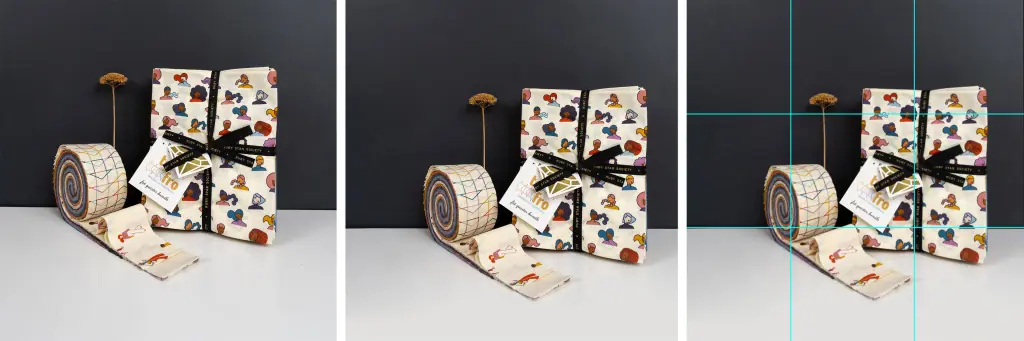
A simple composite involves placing one image into another, for example, replacing a can in a complete picnic table scene.
This option is great for brands looking to save money on photoshoots instead of incorporating their product into various post-scenes. It’s also a good fit for products with different color options, allowing you to show each option in the same setup. Photoshop composite art makes this process cost-effective and efficient for showcasing products in various settings without needing multiple photoshoots.

A complex composite involves multiple images, such as placing all of the elements of a picnic on an empty table.
The benefit of a more complex composite is that you can make it whatever you want! We can even change a complex composite’s color, mood, and lighting to match your needs. You can also create multiple crops from one final image, delivering various assets. However, it requires more work, so we equate three simple composites to one complex one regarding pricing. This method offers creative flexibility but needs more time and expertise to ensure realism.
How Composite Images Can Help You
Photoshop composite art can be a valuable tool for many business types. It’s a creative way to showcase your product in innovative ways. Plus, it can save money on new photoshoots, as you can use your current imagery to create composites. Explore our composite services to see how you can benefit from this cost-saving approach.
Before you get started, remind yourself:
What is my website’s end goal? (e.g., attract new clients, showcase products, feature work, book appointments)
Who is my target audience?
What would I like visitors to do? (e.g., subscribe to a newsletter, buy a product or service, contact me)
Your clear vision will guide your decisions for hosting, design, and content.
Best Tools for Composite Art
Adobe Photoshop is hands-down the best software for creating Photoshop composite art. If you’re looking for something simpler, Canva offers a background removal feature that lets you quickly and easily move your image into a new scene. However, it is more limited because it cannot manipulate shadows or create lighting effects with brushwork.
Photoshop is available for any user with a paid subscription. But if you want professional-level results, you’ll want to partner with an expert. My 15+ years of editing give me the skills to make composites look like they were shot that way. Visit Adobe Photoshop’s website to learn more about its features.
AI is another option for compositing, but it has drawbacks. First, AI platforms are still developing, and using AI-generated content may pose risks for long-term use. Second, AI often struggles to create realistic depictions of people, frequently producing images with extra limbs or other distortions. While AI can be a tool, expertise is required to prompt it effectively and ensure quality results.
Save money and stand out by planning retouching into your photo plan!
Why Experts Matter for Photoshop Composite Art
Okay, I’m biased since I want to work with you! But really, we talk about the importance of art and then forget its place in marketing and branding. Photoshop composite art requires a human touch to connect authentically with your audience.
Choosing a professional ensures your composite imagery is visually stunning and uniquely tailored to your brand. We are passionate about using our art form to create visuals that help creative businesses stand out. Whether you want to revamp your branding or elevate your product presentation, we’ve got you covered.
Ready to Transform Your Brand?
Take the first step toward unlocking the potential of Photoshop composite art. Schedule a free 15-minute consultation call or explore our 1:1 services for personalized guidance. Book your discovery call today and let’s create something extraordinary together!
Get Inspired & Stay Ahead
Straight to Your Inbox!
- Branding & marketing tips to help your business shine.
- Insightful advice to make your brand unforgettable and connect with your dream clients.
- Be the first to know about open bookings and special offers.
- Thoughtful, actionable ideas — no fluff, just creative value.